Ready to Take Control with SentryPC?
Join thousands of satisfied customers who trust SentryPC for their remote monitoring software needs. Start your journey today!
SentryPC is the industry-leading remote monitoring software that combines powerful RMM capabilities, advanced employee monitoring, and comprehensive parental control into one cloud-based platform. Monitor, manage, and secure unlimited computers and mobile devices from anywhere in the world — in real-time.
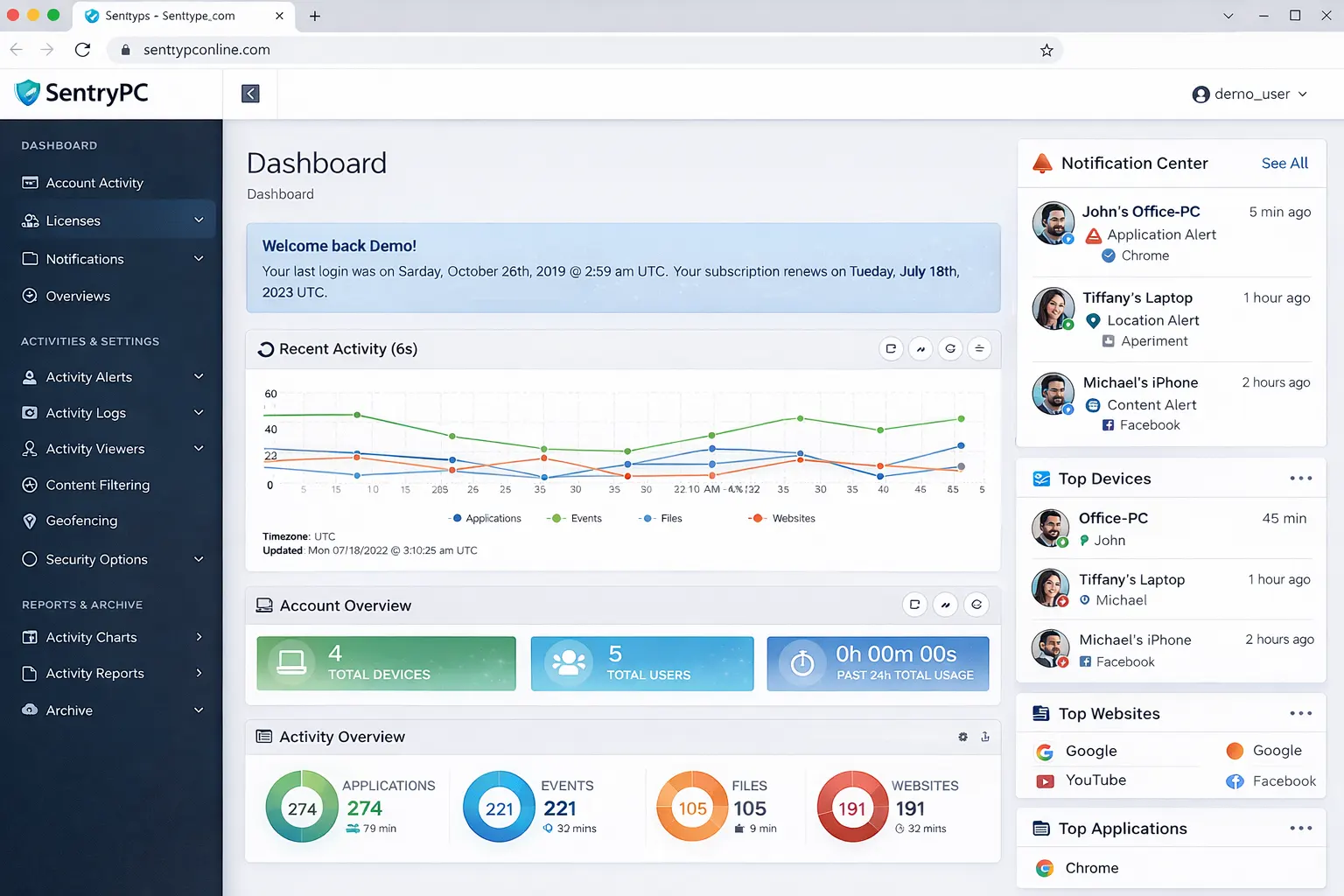
Without proper RMM software, you're leaving your business productivity, data security, and family safety at risk. Discover the challenges that SentryPC solves for thousands of users worldwide.
Employees spending 2-3 hours daily on non-work activities like social media, shopping, and personal browsing — costing businesses thousands annually.
Sensitive company data, client information, and trade secrets being shared or stolen without proper employee monitoring software in place.
No visibility into what remote employees are doing during work hours — are they working or watching Netflix? SentryPC RMM software eliminates this guesswork.
HIPAA, GDPR, and industry regulations require proper monitoring. Without remote monitoring software, your business faces heavy fines and legal consequences.
Children accessing explicit websites, violent games, and age-inappropriate content without any parental control software to filter and block harmful material.
Kids spending 6+ hours daily on phones and computers — affecting sleep, academics, and mental health. SentryPC helps you set healthy boundaries.
Hidden dangers from strangers in chat rooms, social media, and gaming platforms. Without activity monitoring software, you don't know who your child is talking to.
Not knowing what your children are sharing online — personal photos, location, contact information — putting them at risk of identity theft and exploitation.
Tracking and controlling hundreds of computers across different buildings or campuses without centralized RMM software is nearly impossible.
Employees or students installing unapproved applications, bypassing security protocols, and creating vulnerabilities that compromise the entire network.
Students browsing social media, playing games, and accessing non-educational content during class time — reducing learning outcomes.
Ensuring devices are used appropriately, maintaining security policies, and generating audit reports for compliance without a dedicated PC monitoring tool.
Average annual productivity loss per employee without employee monitoring software
Increase in cybersecurity incidents when remote monitoring software is not implemented
Children exposed to inappropriate content daily without proper parental control software
Higher risk of data breaches for companies without centralized RMM tools
RMM (Remote Monitoring and Management) software is the backbone of modern IT management, enabling businesses and families to monitor, manage, and secure devices from anywhere. SentryPC represents the next evolution of remote monitoring software.
Monitor employee productivity, ensure data security, and maintain compliance with employee monitoring software across remote and in-office teams.
Protect children from inappropriate content, manage screen time, and stay informed about online activities using parental control software.
Manage computer labs, ensure students stay focused on learning, and prevent access to distracting websites during class hours.
Manage unlimited devices across multiple locations, generate compliance reports, and maintain network security with centralized PC monitoring tools.
Studies show organizations using RMM tools see up to 35% improvement in employee productivity by eliminating time-wasting activities.
Remote monitoring software helps detect suspicious activities, prevent data breaches, and ensure compliance with security policies.
With 40% of employees working remotely, SentryPC RMM software provides visibility and control regardless of where your team is located.
Automated monitoring eliminates manual supervision, freeing up IT resources and giving parents peace of mind without constant checking.
| Feature | Traditional Methods | SentryPC RMM Software |
|---|---|---|
| Remote Access | Requires physical presence | Anywhere, anytime |
| Real-Time Monitoring | Manual spot checks | Live activity updates |
| Centralized Management | Individual device access | One dashboard for all devices |
| Content Filtering | Basic browser settings | Advanced filtering with scheduling |
| Reporting & Analytics | Manual log review | Visual charts & downloadable reports |
| Cross-Platform Support | Limited compatibility | Windows, Mac, Android, Chromebook |
SentryPC has been leading the remote monitoring software industry since 2005
Trusted by businesses, parents, and IT professionals globally
Monitor all your devices regardless of operating system
Join thousands of satisfied users who trust SentryPC for their monitoring needs.
A lightweight monitoring agent is installed on each device you want to monitor — Windows, Mac, Android, or Chromebook. Installation takes less than 2 minutes.
The remote monitoring software continuously captures activity data — websites visited, applications used, keystrokes typed, screenshots, and location information.
All data is encrypted and transmitted to your secure SentryPC cloud account. Login from any web browser to view activity logs, reports, and visual charts.
Apply filtering rules, time restrictions, and content blocks instantly. Changes take effect in real-time without needing physical access to the device.
Join thousands of satisfied users who trust SentryPC for their monitoring needs.
With over 21 years of innovation, SentryPC combines powerful RMM capabilities, advanced employee monitoring, and comprehensive parental control into one seamless platform. Trusted by 50,000+ users worldwide.
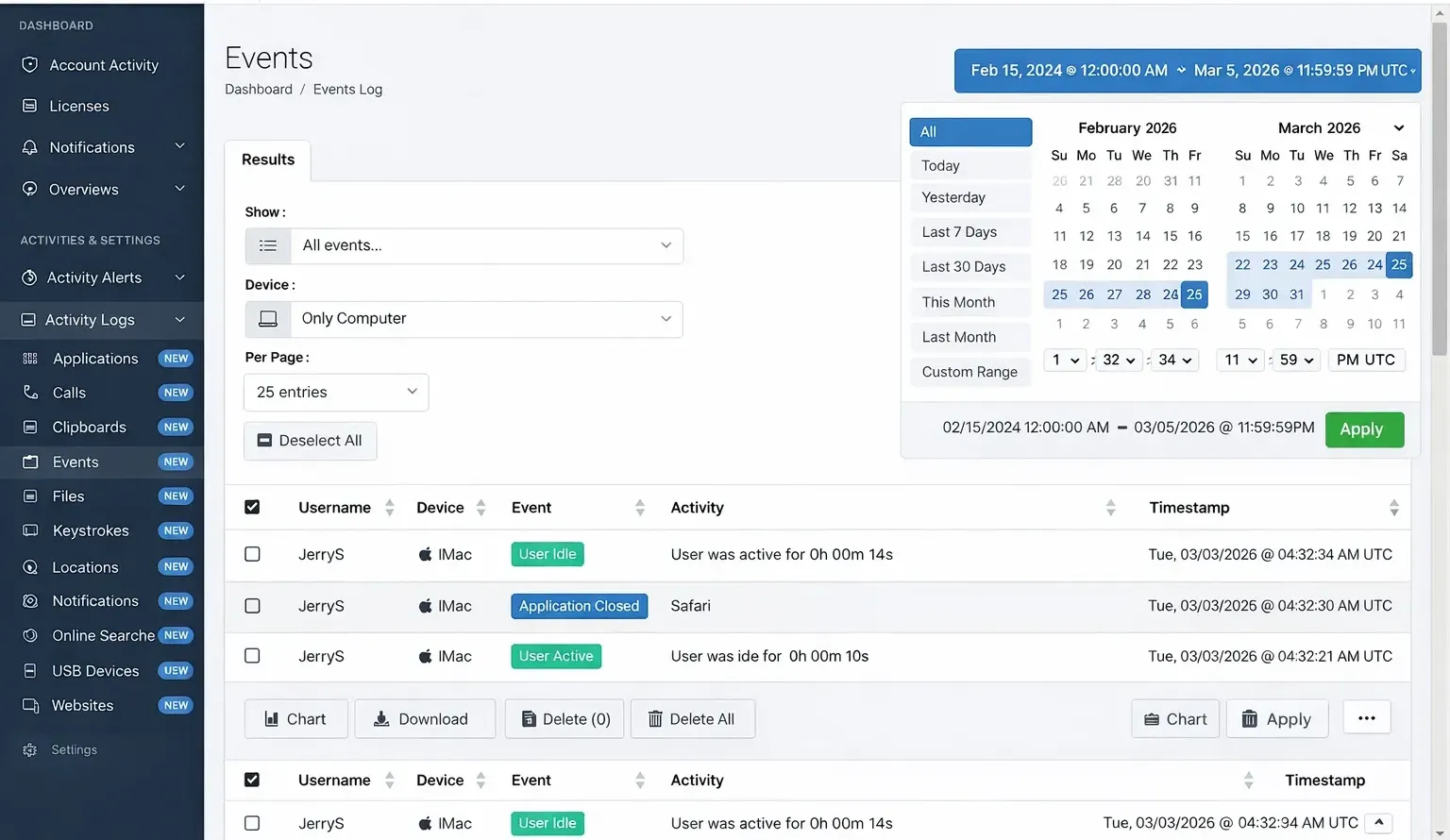
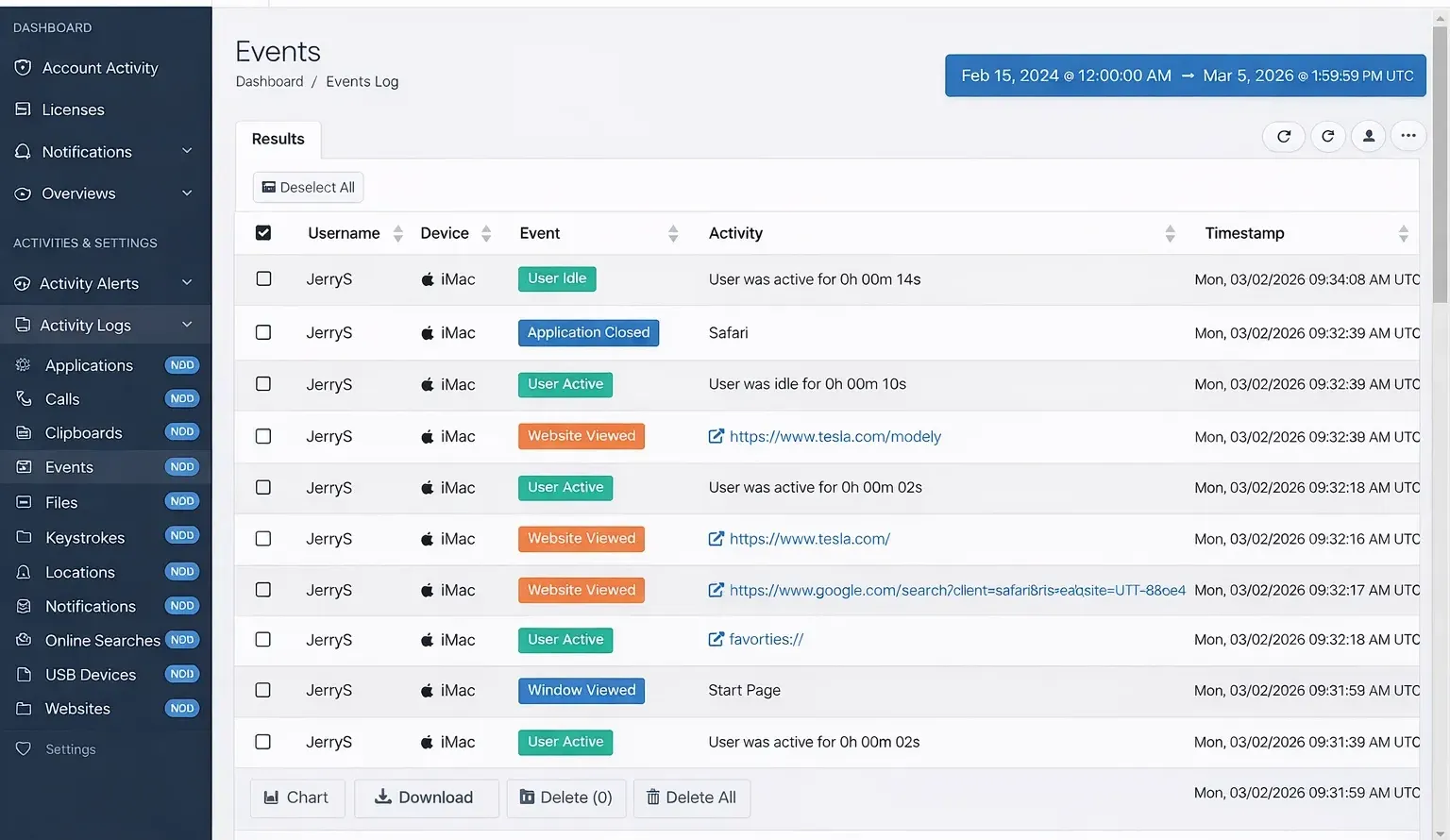
Every activity your users perform on the computer or phone is recorded in real-time and in full detail for viewing — you will know exactly what they did and when they did it.
Filter applications, games, websites, and keywords for all users — completely block content or choose specific hours of the day it is allowed or blocked for each user.
Control when the device can be used by creating daily schedules — select what hours of each day usage is allowed and set maximum usage limits for each day or the week.
Login to your secure cloud-based account from any web-enabled device, at any time, from anywhere. Once installed, you never need to access the device again — all logs, reports, and settings are in your account.
SentryPC is compatible with Windows, Mac, Android, and Chromebook — use SentryPC RMM software on all your devices with a single license.
View user activities in real-time, as they happen, right in front of your eyes — apply user settings instantly to the remote computer. No delays, no waiting.
SentryPC operates in complete stealth, unknowingly to users of the computer. Optional warning messages can be shown if you wish. Perfect for discreet employee monitoring software.
Manage any number of devices and users from your cloud account — even if they are spread over different locations and networks. The ultimate RMM solution for IT admins.
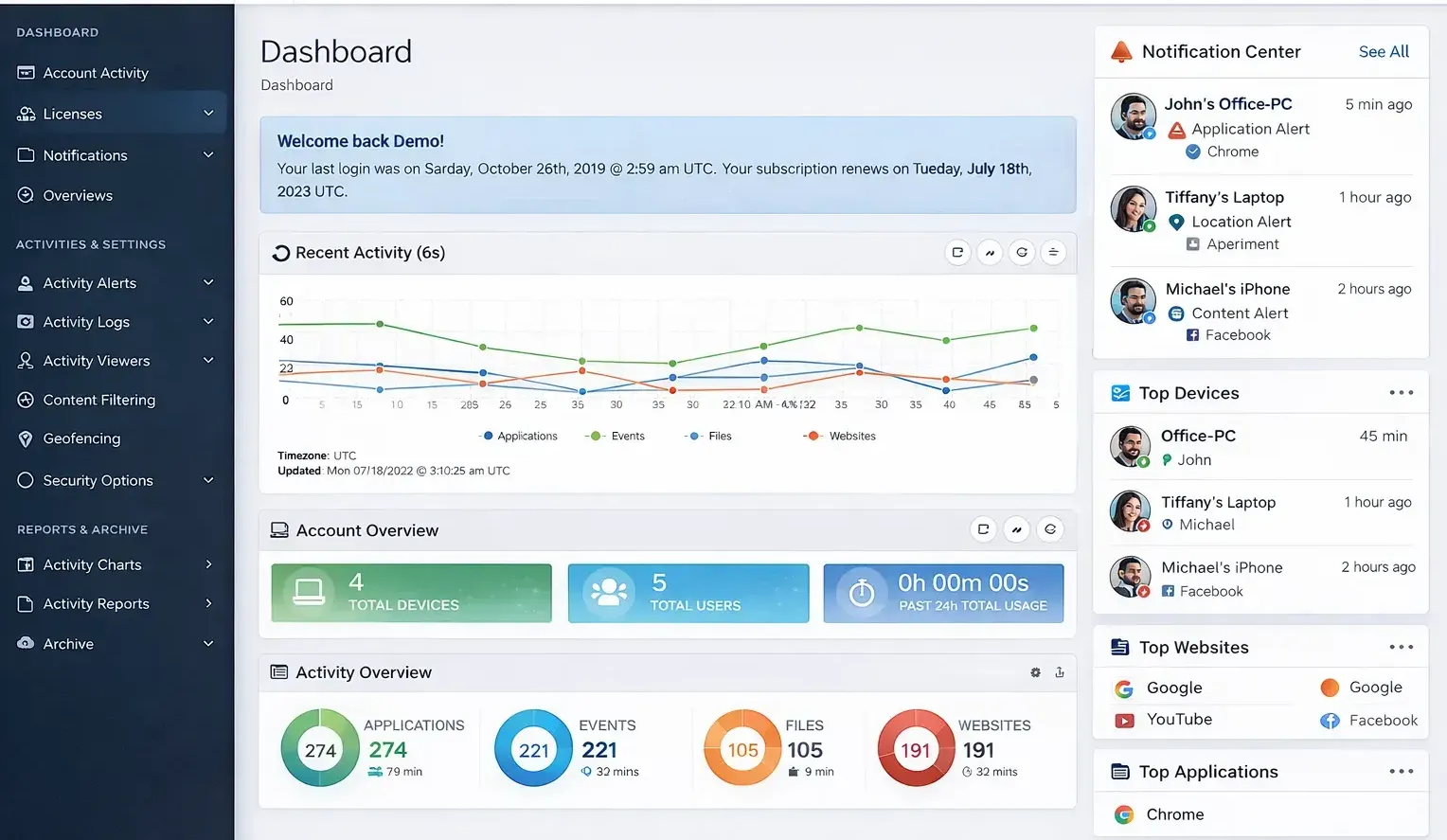
View in-depth usage reports detailing what activities are occurring the most and by what users. Create visual charts, download archives, and get activity overviews instantly.
Stop guessing and start knowing exactly how they use the computer, phone, and Internet in full detail. SentryPC has been the leader in user activity monitoring and control for over 21 years!
Join thousands of satisfied customers who trust SentryPC for their remote monitoring software needs. Start your journey today!
Stop guessing and start knowing exactly how they use the computer, phone, and Internet in full detail. SentryPC combines advanced activity monitoring, extensive content filtering, and powerful time management into one seamless platform.
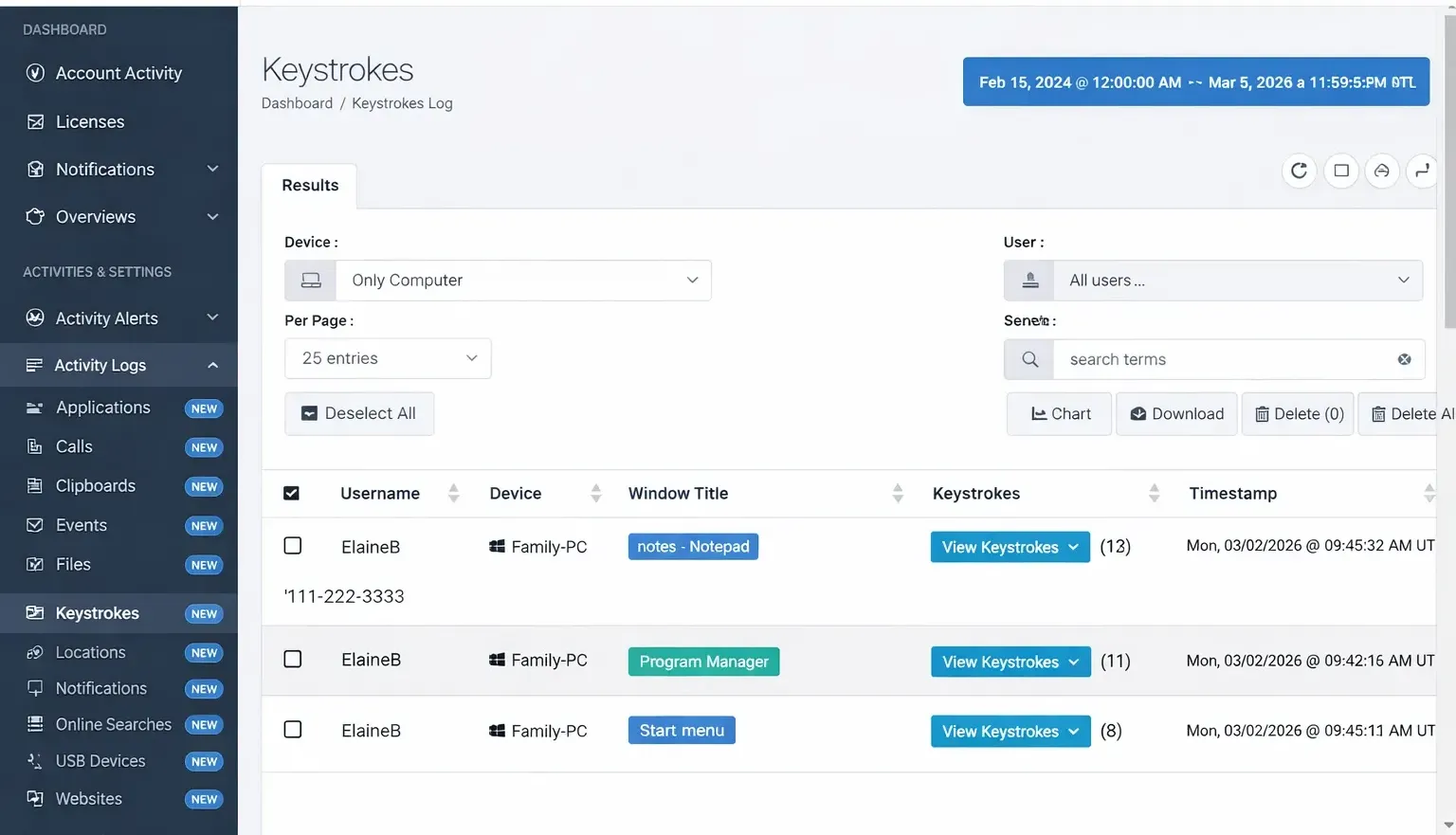
Record all keystrokes made by the user along with the window title they were typed in, how many total keystrokes were typed, and when it occurred. Perfect for understanding what users are typing and communicating.
Every website visited is recorded along with the start time, stop time, and how much time the user interacted with the website. Dark web activity through Tor browser and incognito mode are both supported and marked.
Log every application or game a user runs, as well as how long they actually interact with each application.
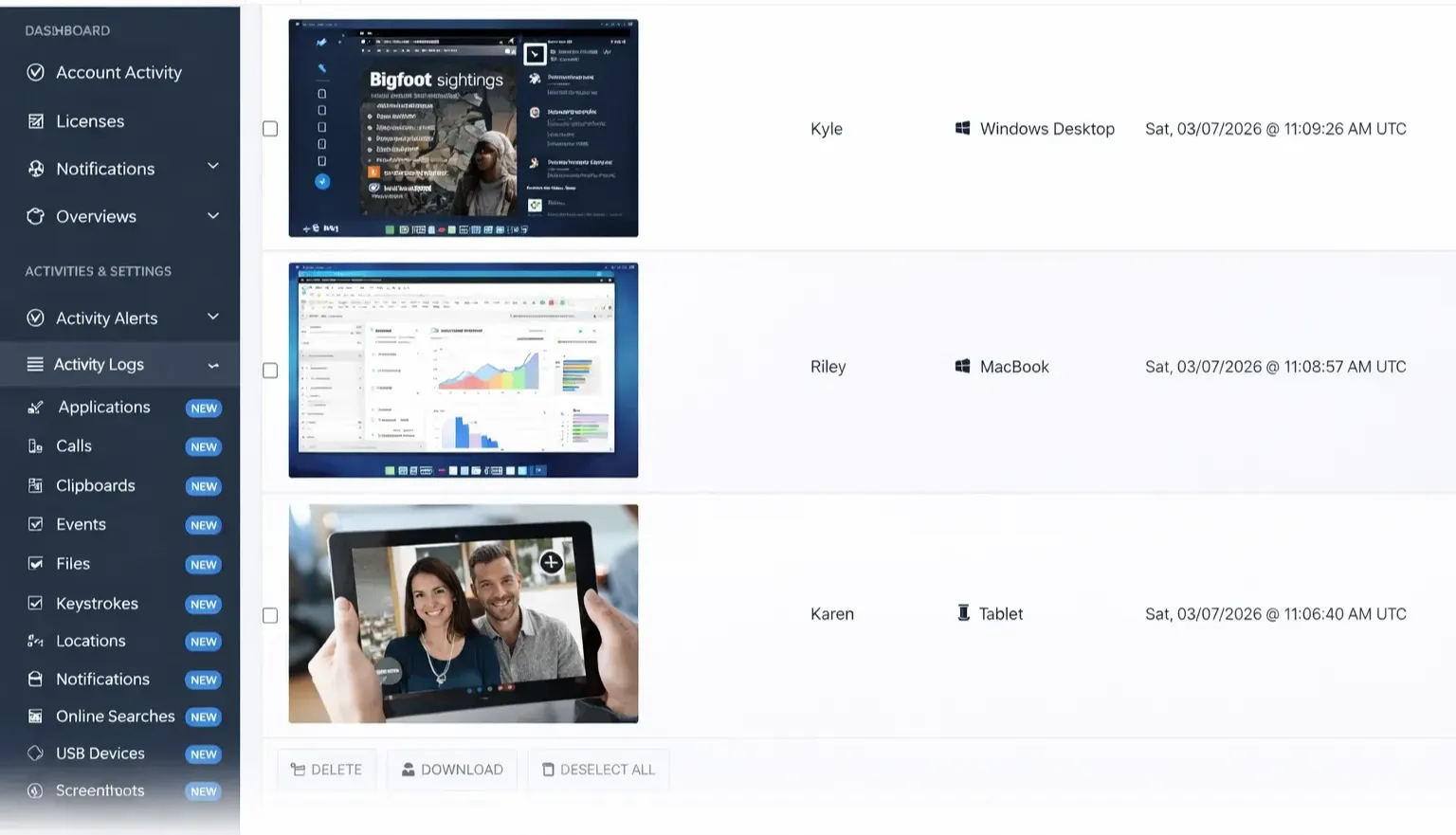
Take snapshots of your desktop at set intervals. Dual-monitor capable with built-in slideshow viewer.
All file activity recorded including copy, create, delete, print, and rename actions with timestamps.
All print job activity recorded along with the filename that was printed and timestamp.
Online searches made by users using search engines recorded with phrase searched and where it was done.
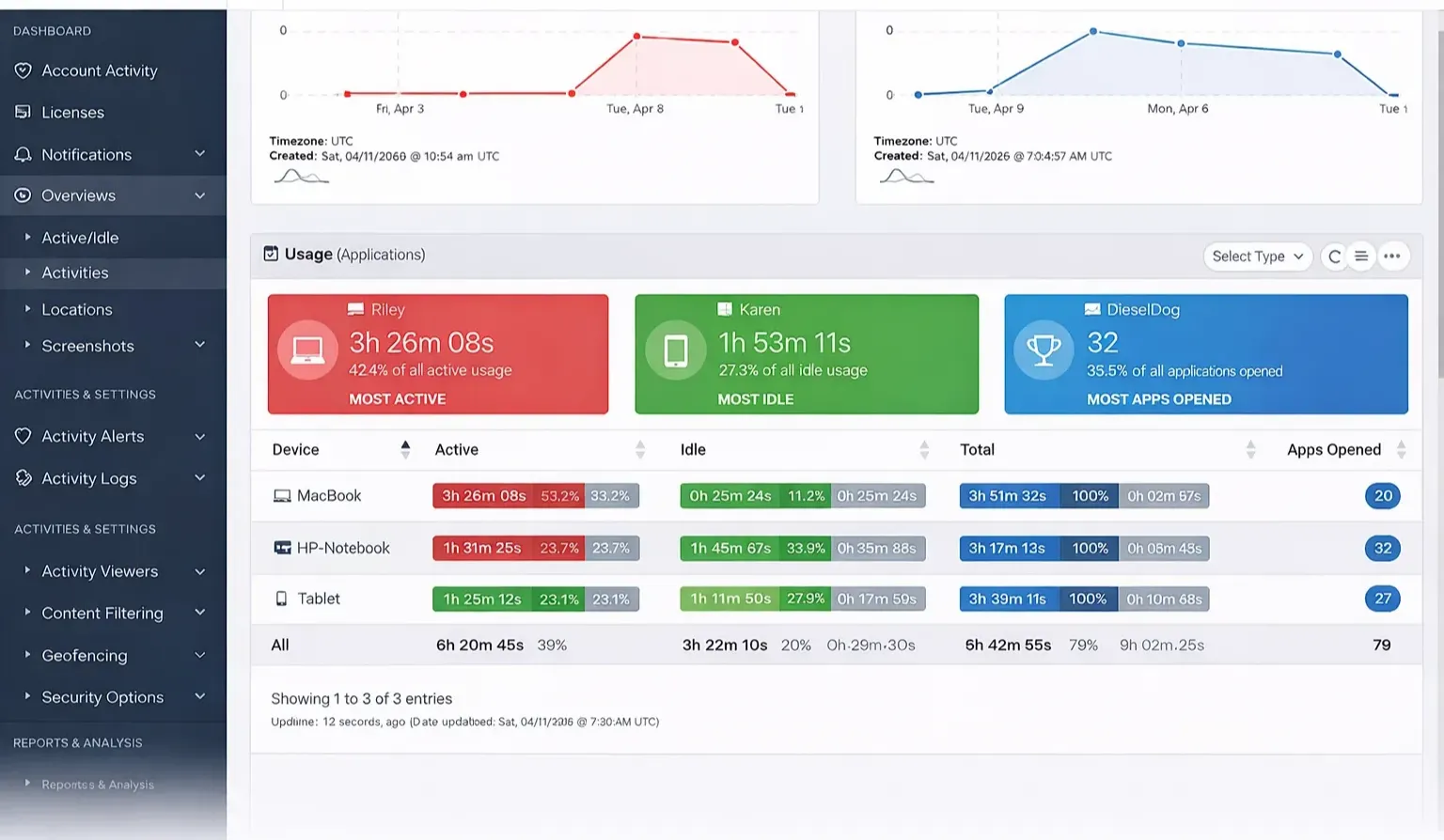
Top used applications, websites, and activities with active time, idle time, and usage averages.
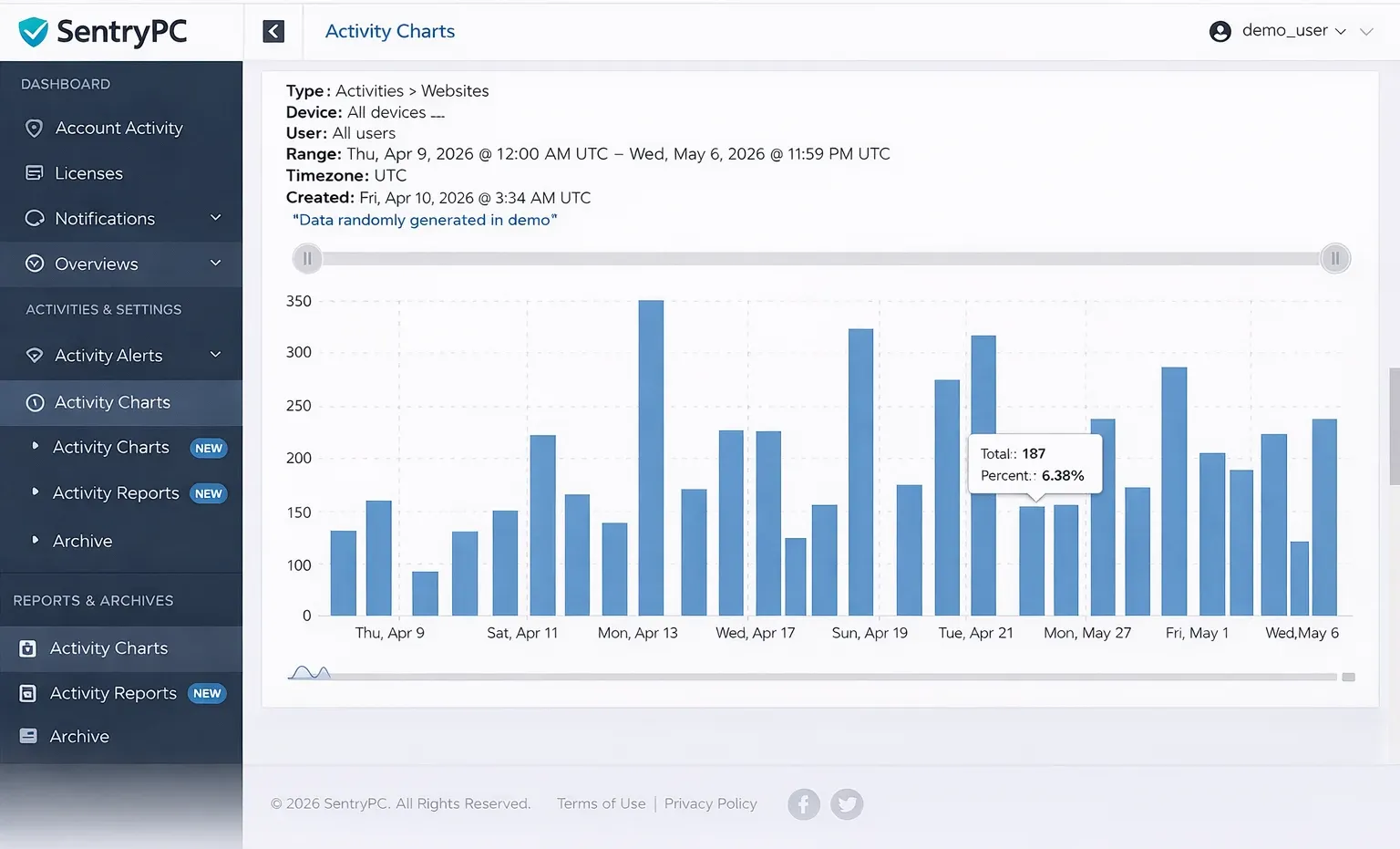
Create visual charts of account logs. Download in CSV, JPG, PDF, or PNG formats.
Every user session recorded with total session time, active time, idle time, and start/stop times.
Filter any application or game for any user. Select what hours on what days it is allowed or blocked. Perfect for restricting gaming during work or study hours.
Filter entire categories of websites or specify custom URLs to allow or block. Categories include adult content, gambling, social media, gaming, and more.
Enter specific words or phrases that cannot be entered by users. Window closes instantly when triggered.
Create custom activity alerts by keyword or phrase. Get notified by email when alerts are triggered.
Receive instant email notifications when blocked activities occur — applications, games, keywords, websites.
Disable access to control panel, task manager, clipboard, external drives, boot keys, and more.
Create a virtual fence around a home location or address with specified distance. SentryPC creates alerts when the user's device enters or exits the fence you created.
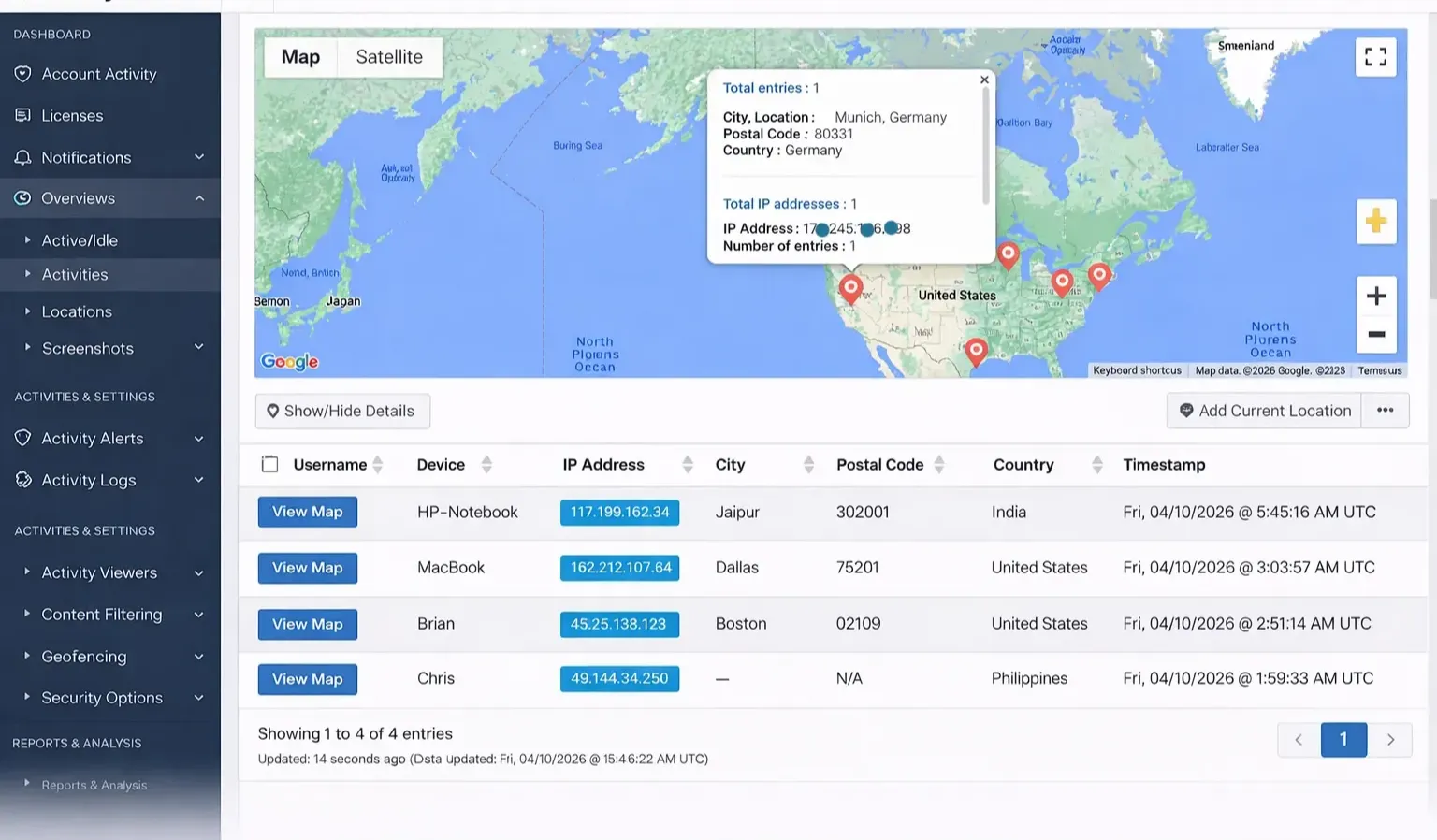
Constant updates showing current location of the device in map form. Precision location information available at all times.
Record IP address and approximate location including latitude, longitude, city, state, country, and postal code.
View how far away current location is from fence center, how far inside/outside the fence, and last update time.
Get instant alerts when a device enters or leaves your defined geofence boundaries.
Specify on what hours on what days users can access the computer. Create custom schedules for each day of the week.
Set maximum allowed time for each day and the week as a whole. For example, allow access from 8am to 8pm but only 4 hours of actual use.
Optional alerts to notify users when their allowed time is about to expire.
View detailed reports showing active time, idle time, and total usage for each user and device.
Login to your secure online account from any web-enabled device to view activity logs and change settings. Your account is available regardless if the device is online or not.
Manage any number of devices and users from your cloud account — even across different locations and networks.
Optional 2FA for added security. Requires time-based one-time password (TOTP) from another device.
All activity logs can be downloaded for offline use. Filter by devices, users, and time ranges.
Updates are free for the lifetime of your subscription. No upgrade fees or hidden costs.
Configurable idle timeout automatically logs you out of cloud account after specified inactivity.
After installing SentryPC RMM software, just sign in to your account to view activity logs and change settings — that is it! No complex configuration, no technical expertise required.
Your download is available immediately after purchase. Choose the version compatible with your operating system — Windows, Mac, Android, or Chromebook.
Step-by-step instructions walk you through installation. The installation module installs a hidden copy that cannot be disrupted or removed by users.
Login to your secure online account from any web-enabled device. Once signed in, you never need to access the installed device again — everything is managed from the cloud.
View real-time activity logs, capture screenshots, filter content, and manage time schedules. All changes take effect instantly on remote devices.
Once SentryPC is installed, you never need to access the device again. All management happens from your cloud account.
Remotely update SentryPC to the latest version. Choose the device(s) you wish to update and SentryPC updates itself automatically.
Uninstall SentryPC remotely through your online account from anywhere in the world. Just choose the device and click uninstall.
Any content filtering or time management changes you make are applied in real-time to the remote device.
View user activities as they happen — keystrokes, websites, applications, and screenshots in real-time.
See how easy it is to monitor, filter, and control user activity with SentryPC remote monitoring software.
Get started with SentryPC in 5 simple steps
I never imagined this would be so easy to use… I was setup and monitoring my employees in no time!
SentryPC is being used in homes, businesses, schools, and many others where activity monitoring, content filtering, and time management of computer and mobile users is needed.
Manage remote and in-office teams effectively with real-time visibility into employee activities. Ensure compliance, prevent data breaches, and maximize productivity.
See exactly what applications and websites employees use during work hours. Identify time-wasting activities and optimize workflow efficiency.
Monitor file transfers, USB drive usage, and sensitive data access. Protect confidential company information from unauthorized sharing.
Get complete visibility into remote employee activities regardless of location. Ensure work hours are used effectively even when team members work from home.
Meet industry regulations like HIPAA, GDPR, and PCI DSS with detailed activity logs and audit trails.
SentryPC has transformed how we manage our remote team. We've seen a 40% increase in productivity and complete peace of mind knowing company data is secure.
Keep your kids safe from inappropriate content, online predators, and excessive screen time. Know exactly what they do online and set healthy boundaries.
Filter websites, games, and apps by category. Block adult content, violence, gambling, and other harmful material automatically.
Set daily time limits and create schedules for when devices can be used. Encourage healthy digital habits and ensure homework gets done.
Monitor social media activity, chat conversations, and messaging apps. Get alerts for suspicious keywords or concerning behavior.
Track real-time location on mobile devices. Set geofences to get alerts when your child leaves safe areas like school or home.
I've tried quite a few parental control apps over the years and SentryPC is by far the BEST! I finally have peace of mind knowing my kids are safe online.
Keep students on task during class hours, prevent access to distracting websites, and manage computer resources efficiently across your institution.
Block gaming sites, social media, and entertainment during class hours. Ensure students stay productive and engaged with educational content.
Centrally manage hundreds of computers in labs, libraries, and classrooms from a single dashboard. Apply settings to all devices instantly.
Monitor which computers are being used, for how long, and for what purpose. Optimize resource allocation and identify underutilized equipment.
Meet federal requirements for internet safety in schools with comprehensive content filtering and reporting features.
SentryPC has been a game-changer for our school district. We can now manage all our computer labs remotely and ensure students stay focused during class.
Whether you're a business owner, parent, or school administrator — SentryPC has the perfect solution for your monitoring needs.
See how SentryPC compares to other remote monitoring software solutions. With 21+ years of innovation, we deliver unmatched features, ease of use, and value.
| Features & Capabilities |
SentryPC
|
Other RMM Tools
|
|---|---|---|
| Activity Monitoring | ||
| Real-time keystroke logging | Full logging with window titles | Limited or no logging |
| Website tracking with duration | Full URLs, time spent, incognito detection | Basic URL logging only |
| Screenshot capture | Dual-monitor capable, slideshow view | Single monitor, no slideshow |
| Application usage tracking | Active vs idle time differentiation | Basic usage logs only |
| File activity logging | Copy, create, delete, print, rename | Not available |
| Print job logging | Full print job details | Not available |
| Content Filtering & Restriction | ||
| Website filtering by category | 15+ categories + custom URLs | Basic category filtering |
| Application/game blocking | Per-user, time-based scheduling | Limited or no app blocking |
| Keyword & phrase filtering | Custom keywords, auto-close on trigger | Not available |
| Security options (disable control panel, etc.) | 15+ security restrictions | Basic restrictions only |
| Email alerts for blocked activities | Customizable alerts | Limited alert options |
| Time Management | ||
| Daily scheduling | Per-day, per-hour schedules | Basic scheduling |
| Maximum usage limits | Daily & weekly limits | Limited or no limits |
| Time expiry alerts | Customizable user alerts | Not available |
| Geofencing & Location | ||
| Geofencing capabilities | Virtual fences with entry/exit alerts | Not available |
| Real-time location tracking | Map view with constant updates | Basic IP location only |
| Cloud & Remote Access | ||
| Cloud-based dashboard | 24/7 access from anywhere | Available |
| Centralized multi-device management | Unlimited devices from one dashboard | Limited devices or separate logins |
| Remote uninstall capability | One-click remote uninstall | Requires physical access |
| Remote update capability | Automatic remote updates | Manual updates required |
| Two-factor authentication | Optional 2FA for security | Available on some |
| Reports & Analytics | ||
| Activity reports & charts | 20+ report types, visual charts | Basic reports only |
| Downloadable archives (CSV) | Full export capability | Limited or no export |
| Activity overview dashboards | Multiple overview options | Basic dashboard |
| Platform Support | ||
| Windows support | 11, 10, 8, 7 (32/64-bit) | Limited versions |
| Mac support | macOS 10.6+ | Recent versions only |
| Android support | Android 7+ with full features | Limited features |
| Chromebook support | Browser activity monitoring | Not supported |
| Pricing & Value | ||
| Starting price | $69.95/year | $99-$299/year |
| Free updates | Lifetime free updates | Upgrade fees often required |
| Free trial available | 14-day free trial | Limited trials |
| Money-back guarantee | 30-day guarantee | Limited or none |
Proven track record with continuous innovation and updates since 2005
Windows, Mac, Android, and Chromebook — all from one license
25+ monitoring features — more than any competitor in the market
2FA, idle timeout, account activity logging, and bank-level encryption
Dedicated support team ready to assist with installation and setup
Lower starting price with more features than competitors
After evaluating 5 different RMM software solutions, SentryPC offered the most comprehensive features at the best price point. The cross-platform support sealed the deal for us.
Join 50,000+ satisfied users who trust SentryPC for their monitoring needs. Start your free trial today!
Start Free TrialDiscover why over 50,000+ users trust SentryPC for their remote monitoring software needs. From increased productivity to complete peace of mind.
Eliminate time-wasting activities and ensure employees stay focused on what matters most. Studies show up to 35% productivity increase with proper monitoring.
Prevent data breaches, detect insider threats, and protect sensitive company information with real-time monitoring and alerts.
Monitor employees, children, or students from anywhere in the world. Access your cloud dashboard 24/7 from any device.
Set daily schedules and usage limits to ensure healthy device habits. Perfect for both employees and children.
Block inappropriate websites, games, and applications. Filter by category or create custom blocklists.
Get detailed activity reports, visual charts, and downloadable data for analysis and compliance.
Monitor all devices — Windows, Mac, Android, and Chromebook — from one centralized dashboard.
No servers to maintain. Access your account from any web browser, anywhere in the world.
Get instant email alerts when blocked activities occur or custom keywords are detected.
Optional stealth mode ensures users remain unaware of monitoring — perfect for discreet supervision.
No upgrade fees or hidden costs. All updates are free for the duration of your subscription.
We believe in transparency. Here's an honest look at what makes SentryPC great and areas to consider.
25+ monitoring features including keystrokes, screenshots, app tracking, and website filtering — all in one platform.
Works seamlessly on Windows, Mac, Android, and Chromebook — monitor all devices from one dashboard.
Access your account from anywhere, anytime. No need to be physically present at the monitored device.
Completely invisible to users — perfect for discreet employee monitoring or parental supervision.
Starting at just $69.95/year — significantly lower than competitors with more features included.
Proven track record with continuous updates and improvements since 2005.
24/7 support with quick response times and knowledgeable staff.
You need to install the software on every computer or phone you want to monitor. Remote installation options available but may require initial setup.
Unlike some basic free tools, SentryPC is a premium software with annual subscription. However, pricing is very competitive for the features offered.
Join 50,000+ satisfied users who have transformed how they monitor and manage devices. Start your free trial now — no credit card required.
Start Free TrialEverything you need to know about SentryPC — from installation to features, pricing, and legality. Find answers to the most common questions below.
RMM (Remote Monitoring and Management) software is a powerful platform that allows IT professionals, business owners, and parents to remotely monitor, manage, and control computers and mobile devices from a centralized cloud dashboard.
SentryPC is a comprehensive RMM software solution that combines activity monitoring, content filtering, time management, and geofencing into one platform. It provides real-time visibility and control over all your devices from anywhere in the world.
Yes, SentryPC is completely safe and secure. The software uses:
SentryPC has been trusted by over 50,000+ users worldwide for more than 21 years without any security breaches.
Absolutely! SentryPC is designed for remote monitoring. Once installed on a device, you can:
Your cloud account is accessible 24/7 from any internet-enabled device — computer, laptop, tablet, or smartphone.
Yes, SentryPC is legal for employee monitoring when used properly. However, there are important considerations:
We always recommend consulting with legal counsel to ensure compliance with your local laws before implementing monitoring software in the workplace.
SentryPC supports multiple platforms with a single license:
Note: iOS (iPhone/iPad) is currently not supported.
SentryPC offers affordable pricing plans:
Yes, SentryPC offers a free trial! You can try the software risk-free to see if it meets your needs. The trial gives you full access to all features.
SentryPC is designed to operate in complete stealth by default:
If you prefer transparency, you can enable optional warning messages to let users know they are being monitored. This is recommended for workplace compliance.
SentryPC provides comprehensive parental control software features:
All features are accessible from your cloud dashboard — no need to access your child's device once installed.
SentryPC offers multiple remote deployment options:
Once installed, the device appears in your cloud account automatically. You can then monitor and manage it remotely without ever needing to access the device again.
Yes! SentryPC allows you to manage unlimited devices from a single cloud account. You can:
Each license allows you to monitor one device at a time, but you can purchase additional licenses at a discounted rate for multiple devices.
Yes! SentryPC captures activity even when users try to hide it:
This ensures you have complete visibility into all online activities, even when users attempt to bypass normal tracking.
SentryPC provides comprehensive customer support:
All support resources are accessible from your cloud account dashboard.
Join 50,000+ satisfied customers who trust SentryPC for their remote monitoring software needs. Whether you're a business owner, parent, or IT administrator — start monitoring smarter, not harder.
I never imagined this would be so easy to use… I was setup and monitoring my employees in no time!
Protect, understand, and manage your users' computer and mobile activities anytime... anywhere... as they happen.
Limited-time offer 👇